If you built databases in Microsoft Access, you know how it should feel: tables as boxes, fields with plain data types like Short Text, Number and Yes/No, and relationships you draw by dragging one field onto another. PgDBDesigner brings that way of working to PostgreSQL, the free database that runs much of the internet, and it runs on Linux, in your web browser.
Open a database and see its design. Change it the Access way. Before anything is touched, PgDBDesigner shows you exactly what it will do, in plain words, and warns you about any data a change would lose. Then it applies everything at once, or nothing at all.
Why PgDBDesigner exists
Many of us have wanted a tool like this since we moved to Linux. PostgreSQL is a superb database, but designing one has meant typing SQL or using tools made for database administrators. Access made database design something an office manager, a church secretary or a small-business owner could do. PgDBDesigner is that, for PostgreSQL.
What it does
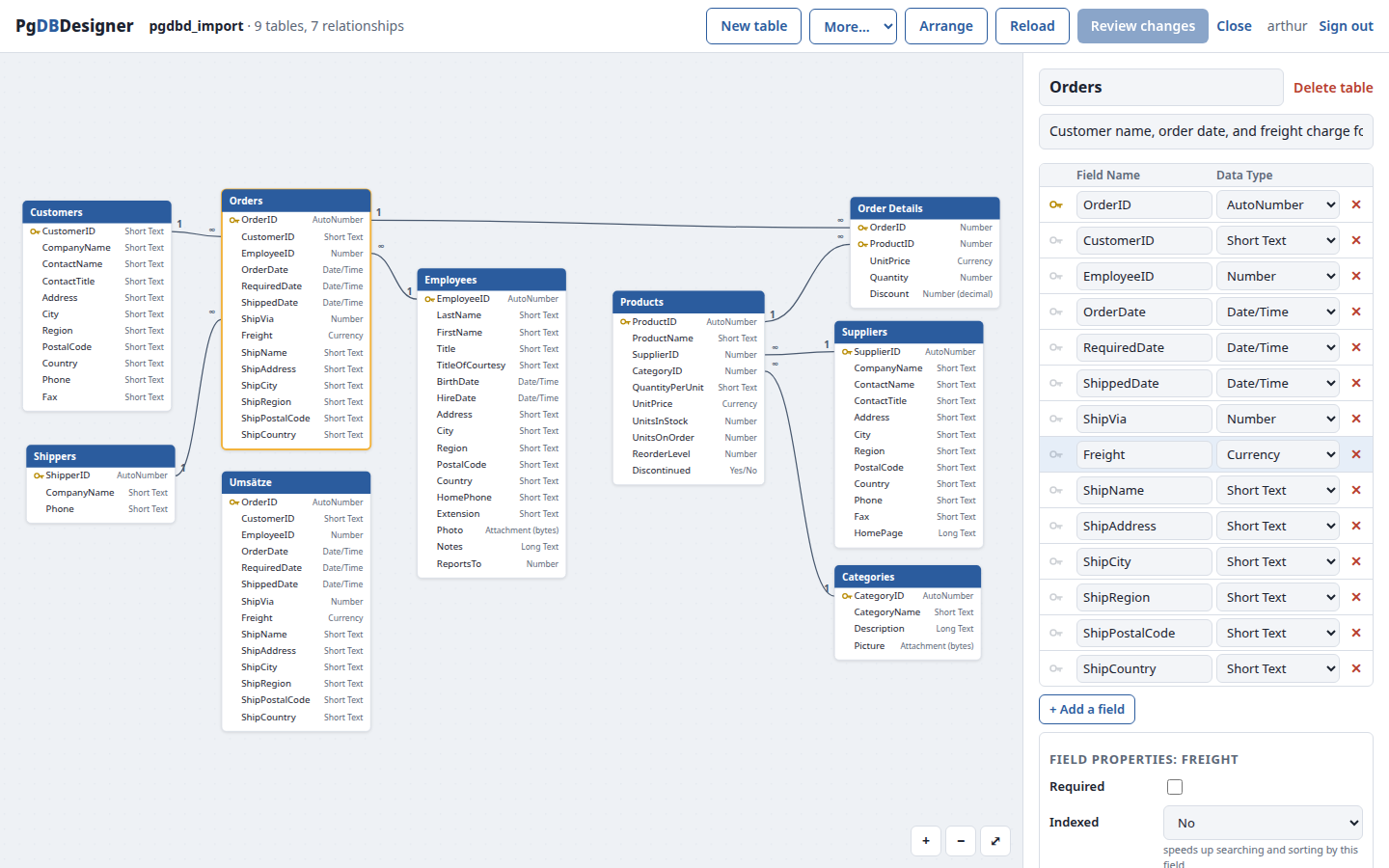
A relationships diagram you can work in
Every table is a box with its fields and their types, primary keys are marked with a key, and relationships are drawn from field to field with the 1 and ∞ ends you know. Drag the boxes where you like, and PgDBDesigner remembers. Arrange puts the tables in order for you.
Tables designed the Access way
- Data types by their Access names: AutoNumber, Short Text, Long Text, Number, Large Number, Decimal, Currency, Date/Time, Date, Yes/No, plus any PostgreSQL type when you want one.
- Field properties under the field list, as in Access’s Design View: Field Size, Required, Indexed (Duplicates OK or No Duplicates), Default Value, Validation Rule and Validation Text, Description.
- Names exactly as you type them, spaces and capitals included (“Order Details” stays “Order Details”).
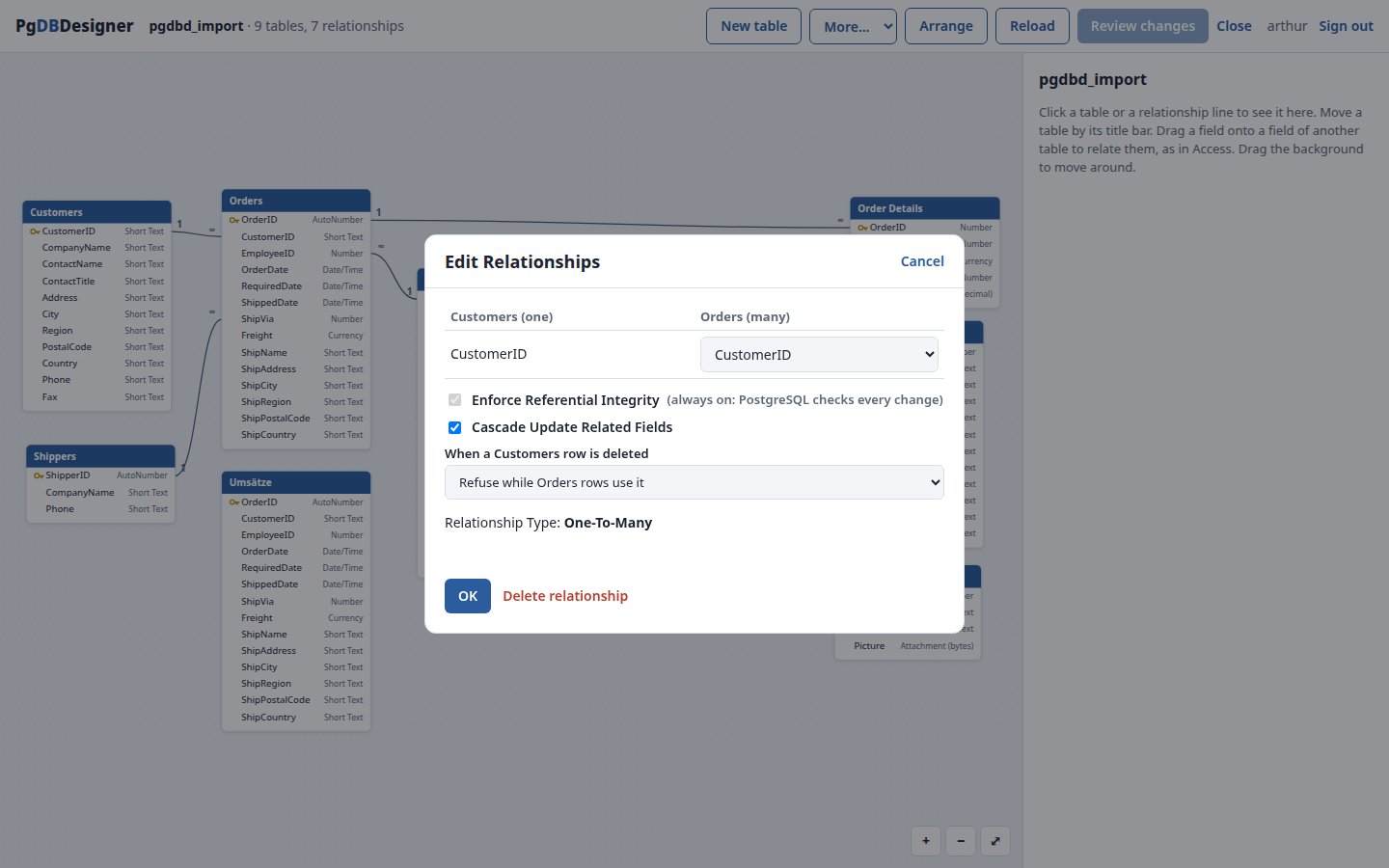
Relationships by drag and drop
Drag a field onto a field in another table and the Edit Relationships dialog opens: the key side becomes “one” whichever way you drag, the field types are checked, and you choose Cascade Update Related Fields and what happens when a row is deleted. Integrity is always enforced, by PostgreSQL itself.
Nothing changes until you have seen it
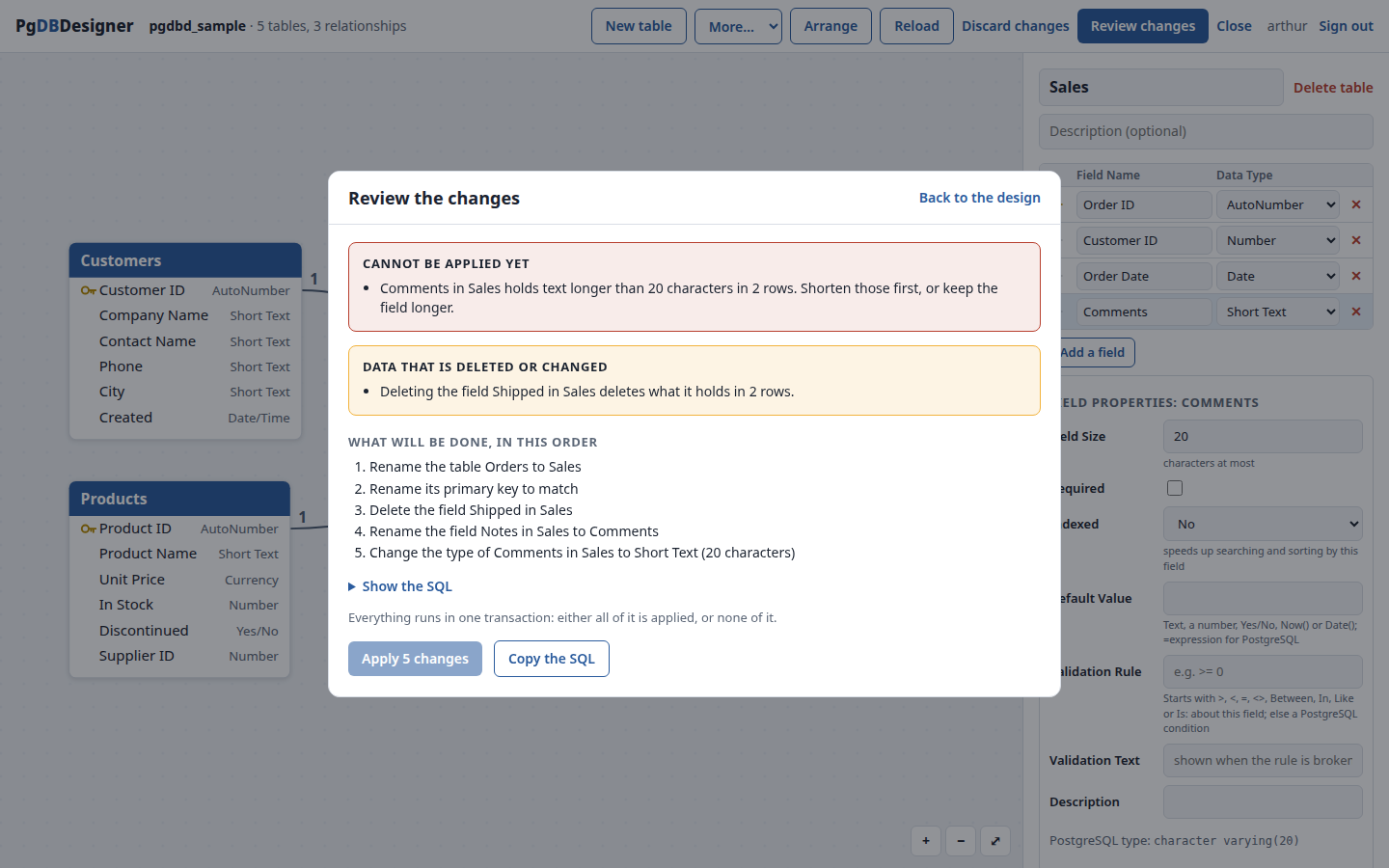
Your changes stay a design until you choose Review changes. PgDBDesigner then compares your design with the database and lists every step, such as “Rename the field Notes in Orders to Comments”, with the exact SQL a click away. It looks at the data already there: rows a deletion would take with it, values a type change would round off, text too long for a smaller field, empty fields that cannot become Required. A renamed field is renamed, never dropped and recreated. Apply runs everything in one transaction: all of it, or none of it.
Bring your Access databases along
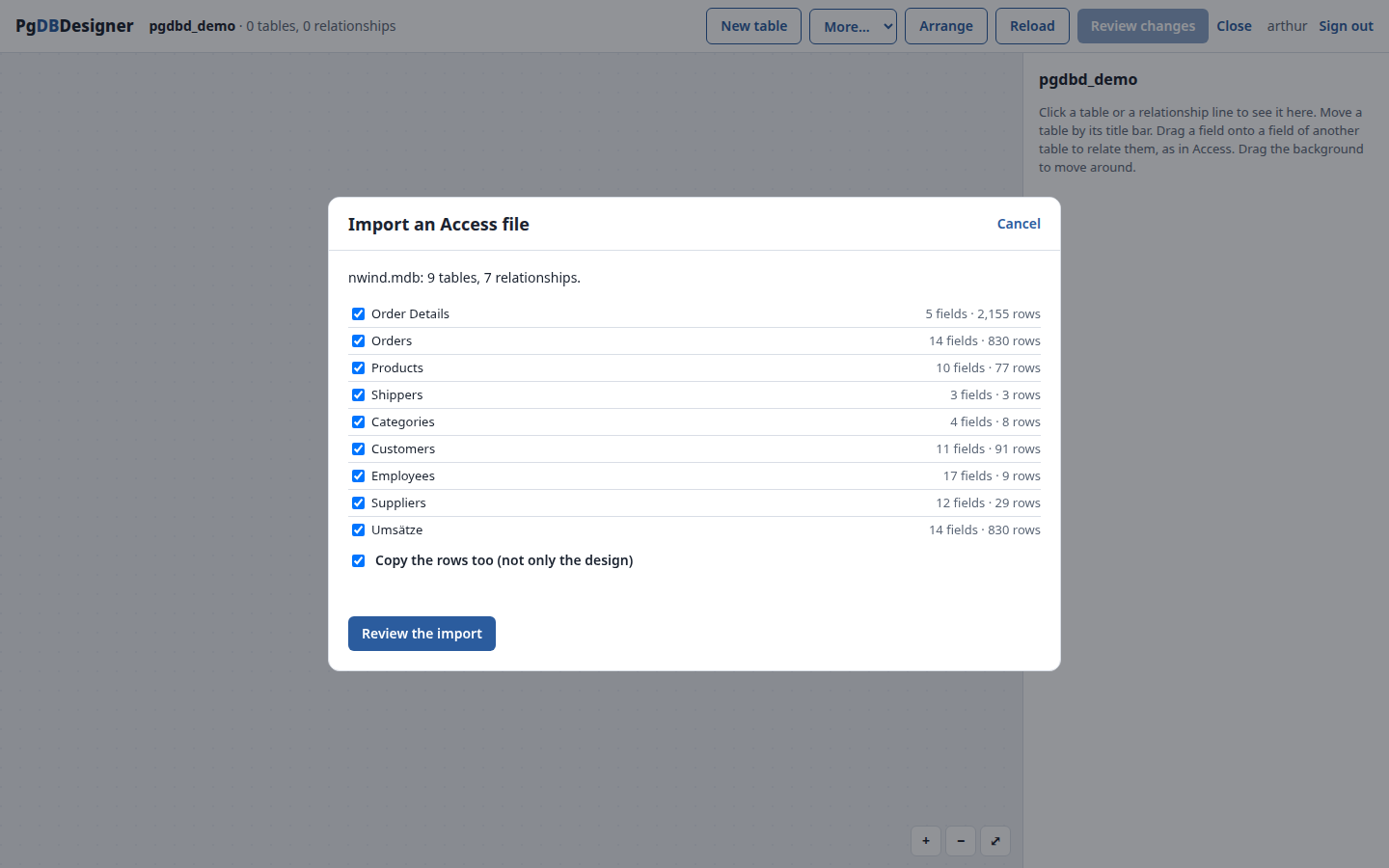
Import a Microsoft Access file (.mdb or .accdb): the tables with their field types, keys, indexes, default values and descriptions, the relationships with their cascade settings, and all the rows, pictures included. AutoNumbers keep their numbers and carry on counting. In our tests, Microsoft’s Northwind sample came across complete: 9 tables, 4,032 rows and all 7 relationships.
Access queries, forms, reports, macros and VBA are not converted: they belong to Access itself, not to the data. PgDBDesigner tells you plainly about anything it leaves out.
And more
- Compare two databases, say a test copy and the real one, and bring either in line with the other, with the same review first.
- Export the diagram as a picture (PNG) or a drawing (SVG), and the whole design as an SQL script.
- Light and dark themes, following your desktop.
Price
| Personal | Business | |
|---|---|---|
| Price | $59 once | $149 per server, once |
| Who it is for | You, on your own computer | A company or organization: everyone on that server |
| Updates | A year of new versions included | A year of new versions included |
| After that | Keeps working, always; new versions $24.99 a year if you want them | Keeps working, always; new versions $24.99 a year if you want them |
Try it first. For 30 days everything works. After that, if you choose not to buy, PgDBDesigner stays useful as a free viewer: the diagram, the table properties and picture exports keep working; editing, applying, comparing, SQL scripts and Access imports need a license.
No strings. Your license is a small text file. There is no license server, nothing phones home, and PgDBDesigner works without an internet connection. Your data never leaves your own computer or server, and the SQL export means your design is never locked in.
Schools, churches and non-profit organizations: write to us about a free license.
Order
Ordering is by email for now. Tell us the edition, the name and email address the license should carry, and for Business the number of servers. We reply with an invoice you can pay online, and the license file follows by email once it is paid. To use it, open License in PgDBDesigner and paste it in.
Download
Version 0.1: pgdbdesigner-installer-0.1.tar.gz (52 MB) · SHA256SUMS
Unpack it and start the installer:
tar xzf pgdbdesigner-installer-0.1.tar.gz
./pgdbdesigner-installer-0.1/pgdbd-installer- It installs PgDBDesigner for you, without an administrator password: it starts when you log in, and PgDBDesigner in your app menu opens it in your browser.
- It needs PostgreSQL on the computer. If it is not there yet, the installer shows you the few commands that install it, for Linux Mint, Ubuntu and Arch-based systems such as Omarchy.
- To import Access files, also install mdbtools:
sudo apt install mdbtoolson Linux Mint and Ubuntu,yay -S mdbtoolson Omarchy and Arch. - Tested on Ubuntu 24.04 with PostgreSQL 16 and on Arch Linux with PostgreSQL 18; developed on Linux Mint.
- Everything works for 30 days. To remove it:
~/.local/opt/pgdbdesigner/uninstall.sh.
Questions
Is it open source?
No. PgDBDesigner is how The JCArtes Foundation pays for its work, including the free software it gives away, such as PgServerTool. We have tried to keep what open source people care about most: a fair one-time price, no tracking, no lock-in, and your data under your control.
Does it change my database behind my back?
Never. Opening a database only reads its design. Changes happen only when you review them and press Apply, and then all together in a single transaction.
Anything else? Write to Support@JCArtes.Org.